Today I want to talk about a piece of software that has completely changed how I work: Wispr Flow. I have tried a lot of voice dictation tools over the years. Windows' built-in voice typing, browser extensions, even programs like Dragon NaturallySpeaking. Some were decent, some were overly limited, and none of them really did what I needed.
Wispr Flow is the closest thing to perfect I have found. It works everywhere on your system. Any text box, any app, any window. I can use it in my browser, in Word, and yes, even right inside Microsoft Access. And the best part is, it does grammar and spell checking in the background before the text even hits the screen. That means you do not have to go back and fix everything afterward. It just works.
I even tried building my own voice dictation system using Google's voice-to-text API. And it worked, sort of. But it was a lot of work, and the results were nowhere near as clean or reliable as what Wispr Flow gives me out of the box.
There is one thing I wish it did better. While it shows you that it's listening with a little visual indicator, it does not show the words as they come in. I personally prefer seeing the text as it's being captured, just to make sure everything is coming through properly. Still, that is a small tradeoff for something that works this well.
If you would like to try Wispr Flow for yourself, they do have a free tier which gives you 2,000 words per week at no charge. Beyond that their Pro subscription is only $12/mo for unlimited use - and believe me, I get a lot of use out of it. I gave it a shot for free, and I liked it enough to pay for the full version.
In full disclosure, I did sign up as an affiliate with them, so I will get a few cents if you decide to sign up. But you know me. I do not recommend anything I do not personally use, and I have been using this myself for a few months now. I absolutely love it. Here's the link if you want to check it out for yourself: Wispr Flow.
Now, this is not quite like the Enterprise computer where you say "Computer, where is Commander Riker?" and it gives you an answer. This is more about turning spoken words into clean, polished text. Think of it more like the captain's log system itself. Speak your log entry, and it is instantly ready for the record. That is what Wispr Flow feels like. Just speak, and your words are captured: clean, correct, and ready to go.
I plan on making a full video on this app in the near future just to show what it can do and how you can integrate it into your Access database. But for now, if you want to check it out, it's real easy to download and install, and it took me two minutes to figure it out, so none of you should have a problem with that.
LLAP/RR
P.S. Drop a comment below if you do decide to check it out and let me know what your thoughts are.
P.P.S. Aside from inserting the links and some formatting (like the bold), I dictated this entire captain's log using Wispr Flow. It was perfect.
It's picked up my wife yelling to me from the next room. Lol
Adam Schwanz
@Reply 18 months ago
Now, this is not quite like the Enterprise computer where you say "Computer, where is Commander Riker?"
So you're saying the next thing your working on is incorporating it with chatGPT? ;)
Sami Shamma
@Reply 18 months ago
I am downloading it right now. For a Dyslexic person like me, it is a God sent. I have tried few but nothing worked as good as Richard describes.
Thomas Gonder
@Reply 18 months ago
@ Richard I've tried so many of these, with disappointment, that I'll wait for your video. I'm curious if it only does English.
@ Richard at least yelling to you and that at you hasn't started yet.
@ Adam I've tried the chatGPT voice recognition, so far it's not been so good. It keeps losing large chunks of what I say.
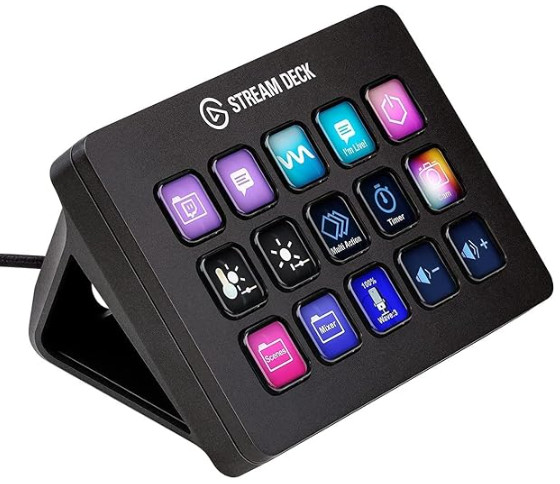
Yeah, you could easily incorporate with ChatGPT. I talked to ChatGPT with it all the time. I have my Stream Deck, which is a little button box that sits on your desktop. I'm going to talk about that another time. But I have two buttons. One is to start voice recording, and then you hit the same button again to stop it (which you can configure on your keyboard but I like the Stream Deck for it). The next button over is Ctrl+Enter which pushes submit on most forms, including my own forum, any web-based forum, YouTube comments, etc. I even have it so my Access database accepts Ctrl+Enter to hit the send button
So yeah, just three taps on my Stream Deck and I talk, and that's it.
Thomas Gonder the video might be a little while I got a bunch of other stuff, and I'm out of Tech Help videos on my queue, so I've gotta do some of those first. But definitely check it out; it's really easy to configure and set up.
This is the one that I use: Elgato Stream Deck MK.2. I'm planning on doing a review / how-to / how I use it video one of these days. It's so much easier than having to remember a bunch of keyboard shortcuts.
I did something similar but went the budget route with an ELSRA PK-2068. It is way less fancy but it gets the job done. My printed key labels are pretty comical compared to the icons used on the Stream Deck keys. :)
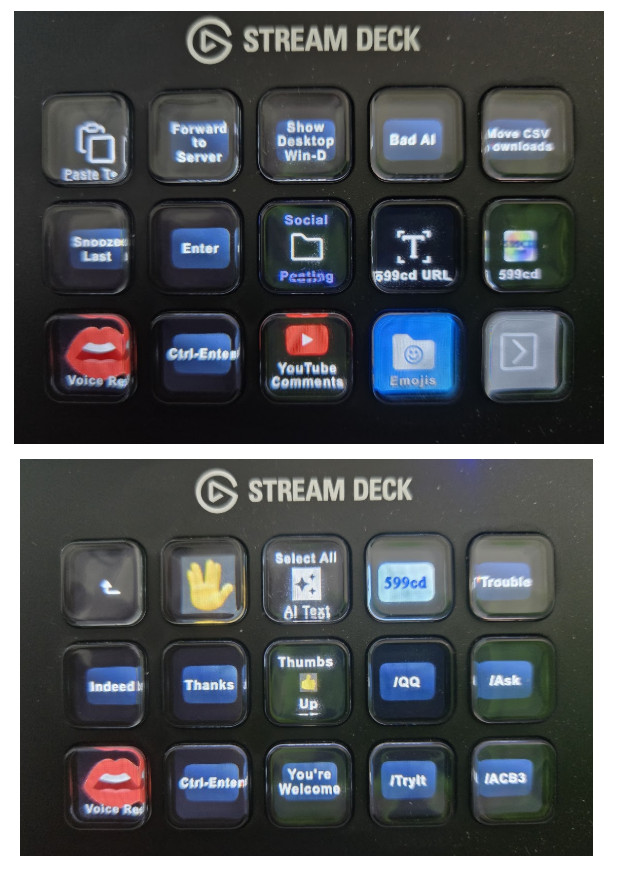
Hey, if it works, it works. I just love the Stream Deck because each button can basically be a folder, and that folder can have more buttons. Here is mine, for example (following image).
The top one is like my main menu. Bottom left is voice recognition and then Ctrl+Enter afterwards to submit what I just said. I've got some folders set up, for example, my emojis folder has a bunch of emojis that I use on a regular basis. I've got one for social posting when I post stuff on Facebook and stuff. Then my YouTube comments one, and those are all folders.
If I pick, for example, YouTube comments, it goes to the next screen which you'll see below, and that's all the stuff that I generally type in as replies on YouTube. Indeed, Thanks, some links to the quick queries, try it, access beginner 3, and so on. And so you can set up folders inside of folders, making your Stream Deck unlimited. I'm not limited to just those 15 buttons. I can set up pretty much as many of those folders as I want, which is really super cool. The graphical buttons are pretty neat too. You can draw your own or include your own graphics. It's really pretty wild.
Alex tried to get me to buy one of these years ago, and I was like, "nah, I'll never use it." Now that I have it, I can't live without it. Whenever I go on the road, I'm like, "damn, I wish I had my Stream Deck."
Quick question: Does the configuration reside completely inside the stream deck? Asked another way, if you plug it into a machine other than the one you configured it with, does it still work?
I haven't tried... But Alex knows it better than I do...
Thomas Gonder
@Reply 18 months ago
Just what I need, more keys to press incorrectly.
Thomas Gonder
@Reply 18 months ago
I tried the Wispur Flow link above, to install the program. It downloaded and seemed to install something, even put an icon on the desktop. Pressing the icon does an hourglass then nothing. I rebooted, uninstalled and reinstalled. Still nothing. What is supposed to come up for the app on a Windows 11 laptop?
Sami Shamma
@Reply 18 months ago
do you see that gray Bar at the Bottom of your screen?
Thomas Gonder
@Reply 18 months ago
I don't see a gray Bar. I see 4 Background processes for Wispr Flow, nothing in the Apps area of task manager.
Sami Shamma
@Reply 18 months ago
I installed it on my Desktop, Laptop and Windows Surface Pro, all Windows 11, worked first time on all three.
Sami Shamma
@Reply 18 months ago
Is their Icon showing in the task bar at the bottom?
Thomas Gonder
@Reply 18 months ago
Yes, the icon shows, but it appears grayed out and doesn't respond to clicks.
Maybe it's a glitch in a recent Wispr upgrade install, or something in my Windows.
Sorry, only students may add comments.
Click here for more
information on how you can set up an account.
If you are a Visitor, go ahead and post your reply as a
new comment, and we'll move it here for you
once it's approved. Be sure to use the same name and email address.
This thread is now CLOSED. If you wish to comment, start a NEW discussion in
Captain's Log.